
Morse Code Chat is designed to make learning and using Morse code more exciting than traditional online tools. Most Morse code converters are simple text boxes that only translate words into dots and dashes. While they get the job done, they often lack interaction and entertainment. This tool brings a fresh and engaging experience to users of all skill levels.
Morse Code Chat feels more like a game than a standard communication tool. Whether you are a ham radio enthusiast, a programmer, or someone who enjoys secret codes, it offers a fun way to explore Morse communication. The interactive features keep users engaged while practicing and sending messages. After a few minutes of use, you may find yourself creating messages just for the fun of hearing the Morse code sounds.
What is Morse Code?
Before we dive into the buttons and sliders, let’s take a second to appreciate what you are about to use. Morse Code is a method used in telecommunication to encode text characters as standardized sequences of two different signal durations, called dots and dashes, or dits and dahs. Created in the 1830s by Samuel Morse and Alfred Vail, it was the primary way to send messages over long distances instantly. It helped save lives on the Titanic, connected armies during wars, and shrank the world.
How to Use the Morse Code Chat
We designed this tool to be incredibly intuitive. You don’t need a manual to get started, but here is a quick breakdown of the three main ways you can play with it.
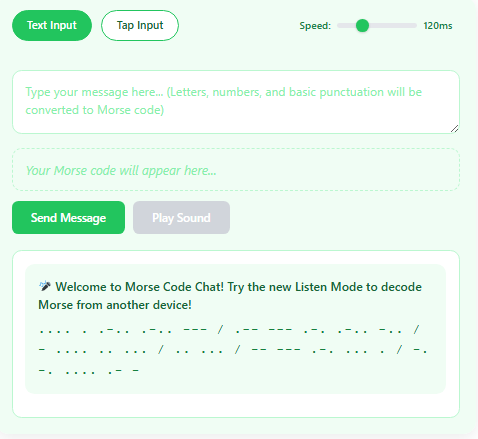
The Classic Text Input
If you just want to translate a message quickly:
- Look for the Text Input box.
- Type anything you want—your name, a joke, or a secret message.
- Hit Send or just press Enter on your keyboard.
- Instantly, you will see the Morse code translation, hear the audio, and see it appear in the chat history.
The Tap Input
This is where it gets fun. Real Morse operators use telegraph keys, and you can simulate that right here.
- Switch your input mode to Tap Input.
- You will see a big button (or use your spacebar).
- Quick Tap = Dot (.)
- Long Press/Hold = Dash (-)
- Try to tap out “SOS” (dot-dot-dot, dash-dash-dash, dot-dot-dot). The system is smart enough to figure out what you meant even if your timing isn’t perfect!
The Listen Mode
This is the feature our users love the most.
- Click the Listen Mode button (usually a microphone icon).
- Play Morse code audio from another device, a YouTube video, or another tab.
- Watch as our tool decodes the sound waves and instantly turns the beeps into text on your screen. It feels like magic, but it’s just pure browser technology working hard for you.
Copy and Paste Anywhere
See a message you like? Just hover over any bubble in the chat stream and click “Copy Morse.” You can paste those dots and dashes into an email, a text message, or a social media post to confuse your friends.
What Makes This Morse Tool Special?
There are plenty of converters out there (we know, we’ve tried them). So, why did we build this one? Here are the features that set us apart and make this the best Morse code experience online.
Authentic 600 Hz Tone
Sound matters. A generic “beep” is annoying. We tuned our audio generator to a crisp 600 Hz tone. This frequency is the standard for many international Morse code communications because it cuts through background noise without being painful to the ears. It sounds professional, authentic, and satisfying.
Perfect International Timing
Timing is everything in Morse code. A dot isn’t just a short sound; it’s a specific unit of time.
- Standard Timing: We follow the strict international rules where a dash is three times longer than a dot.
- Farnsworth Method: If you are learning, you know that real speed is hard. We support the Farnsworth timing method, which plays the characters at a slow speed but keeps the spacing tight. This helps your brain recognize the rhythm without getting bored by long silences.
A Speed Slider That Actually Works
On other websites, changing the speed might only change the audio. On our tool, the Speed Slider changes everything.
- It speeds up the audio.
- It slows down the visual flashing.
- It adjusts the listening decoder’s sensitivity. Whether you are a beginner crawling at 5 Words Per Minute (WPM) or a expert zipping along at 30 WPM, this tool adapts to you.
Microphone Listening That Works
Most web-based Morse decoders struggle with background noise or require you to upload a file. We used the latest Web Audio API to create a microphone listener that runs right in your browser.
- No external plugins needed.
- No software to download.
- It listens to the live audio from your environment and decodes it in real-time.
Your Conversations Are Saved
We know those late-night Morse sessions can get funny. We don’t want you to lose your “dumb late-night conversations.” That’s why every message you send is automatically saved to your browser’s local storage.
- Note: This data lives only on your device. We don’t store your chats on a server. You can close the tab, come back tomorrow, and your history will still be there.
Mobile Friendly
We didn’t just build this for desktop users. We optimized the buttons and the tap pad for touchscreens.
- The tap button is large and responsive.
- The layout fits perfectly on a phone screen.
- Go ahead, pull it out in the movie theater (quietly!) or annoy your friends at the diner by tapping out secret messages.
Heads-Up: What to Expect Right Now
We are transparent about where we are in the development process. Right now, Morse Code Chat is a “sandbox” environment.
- Solo Play: It is currently just you chatting with yourself. However, we have included a cheeky “Bot” that replies to you so you aren’t talking to a void.
- Testing Phase: We are actively testing the listening accuracy, the mobile tapping sensitivity, and how the tool handles weird punctuation. If you find a glitch, please let us know!
The Future: Real Two-Person Morse Chat
We have big plans. Very soon, we are flipping the switch to turn this into a real-time, two-person chat room. Imagine this: You generate a link, send it to a friend (or a stranger), and instantly you are talking in dots and dashes. It’s like WhatsApp, but cooler. It’s for pirates, astronauts, spies-in-training, and people who still think walkie-talkies are the peak of technology.
Want to Be the First to Know When We Launch?
We are working hard to build the real-time multiplayer feature. If you want to be part of the first group to try it out, we have a special notification system just for you.
We don’t do email newsletters that get lost in spam. We go direct.
Do you want me to message you the second we launch real two-person Morse chat rooms?
Frequently Asked Questions
We get a lot of questions about how the tool works and how to get the best results. Here are the answers to the most common queries.
Does this work on my phone?
Yes! We built this with a “Mobile First” approach. The interface is responsive, meaning it adjusts to fit your screen size whether you are on an iPhone, an Android, a tablet, or a laptop. The tapping feature works great with touchscreens, making it feel like you are using a real telegraph key.
Why can’t I send emojis?
Great question! Standard Morse code (International Morse) was invented way before computers, so it was designed for the Latin alphabet (A-Z), numbers (0-9), and basic punctuation.
- We are working on adding support for “Extended Morse” or Unicode translations, but for now, emojis might break the translation or show up as
[?]. Stick to text for the best experience!
Can I change the tone frequency?
Currently, we have tuned the app to a 600 Hz tone because it is the gold standard for clarity.
- However, our Listen Mode (Decoder) is wide-band. This means it can hear Morse code played at various pitches, not just 600 Hz. So even if you are listening to a 700 Hz or 500 Hz source, our tool should still translate it.
Is the microphone listening safe?
Absolutely. We take your privacy very seriously.
- The microphone feature uses a technology called the “Web Audio API.”
- This means the audio is processed locally inside your browser.
- No audio data is ever sent to our servers. No one is recording you or listening to your conversations. It is completely client-side processing.
Who built this?
This tool was designed and developed by a small team of tech enthusiasts who love retro communication. We believe that old technology shouldn’t die; it should just get a modern upgrade. We wanted to create a free, accessible way for anyone to learn Morse code without needing expensive radio equipment.
I found a bug / have an idea!
We love feedback! Since we are in the testing phase, your input is valuable.
- If the decoder isn’t catching your taps correctly.
- If you think a certain feature would be cool.
- If you found a weird glitch.